
Summary
Editor's rating
Value for money: good deal if you actually use the features
Design and build: big dock, low robot, fairly clean look
Battery life and charging: enough for most homes, but not unlimited
Everyday comfort: noise, maintenance and how “hands-free” it really is
Vacuum and mop performance: good daily cleaner with a few blind spots
What you actually get and how it behaves day to day
Pros
- Strong everyday cleaning on hard floors and carpets with decent pet hair pickup
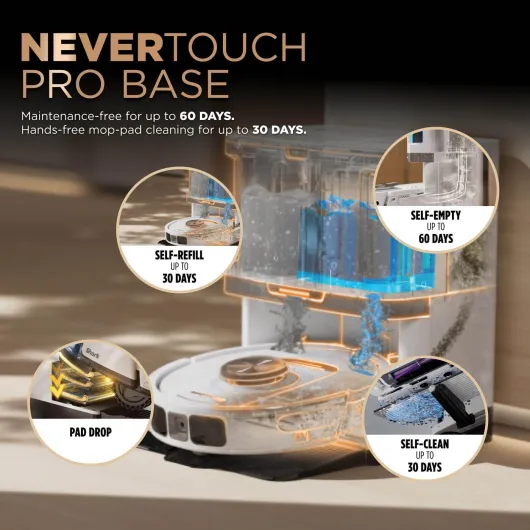
- All‑in‑one dock that self‑empties, washes mops at high temperature, and dries them
- Good app with room‑by‑room control, custom carpet strategy, and flexible scheduling
Cons
- Still struggles with low objects like slippers, cables, and small toys
- Large dock takes up noticeable space and needs access to power and water handling area
- Corners and very tight spaces still need occasional manual cleaning

Specifications
View full product page →| Brand | roborock |
A robot vac that actually made me vacuum less
I’ve been using the Roborock Qrevo S Pro for a while now on a mixed setup: hard floors, rugs, one carpeted room, a dog that sheds, and the usual mess of shoes and cables. I went in a bit sceptical, because robot vacuums often sound great on paper and then spend half their life stuck on a sock. With this one, I honestly do vacuum a lot less by hand, but it’s not magic and it still has some quirks you need to work around.
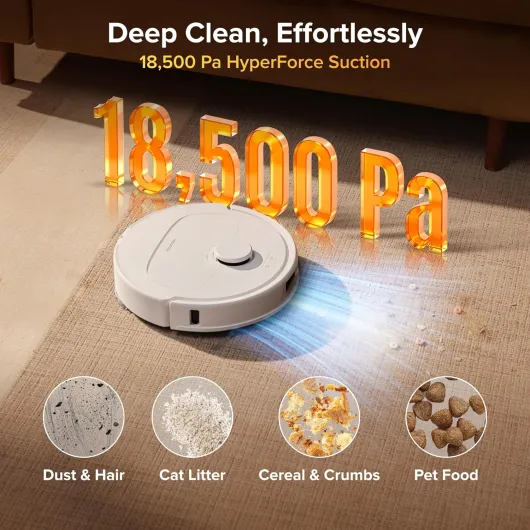
The big headline specs are the 18,500 Pa suction, dual spinning mops, and the all‑in‑one dock that empties the dustbin, washes the mops at 75°C, and dries them with warm air. In daily use, the numbers don’t matter as much as: does it pick up hair, crumbs, and light dirt reliably, and can I mostly forget about it? For me the answer is mostly yes, with a few caveats around small objects and light rugs.
I run it in a two‑bedroom space plus hallway and open‑plan living area. I’ve set it to clean every day or every other day depending on how messy the dog is that week. The app tells me it usually covers around 30–45 m² in a run, and it does that on one charge without breaking a sweat. Noise-wise, it’s quiet enough that I can take a call in another room while it’s vacuuming, and it only gets noticeably louder when it hits carpet and boosts suction.
If you expect it to fully replace deep cleaning in corners and tight spots, you’ll be disappointed. It misses some edges and can’t deal with absolute chaos on the floor. But if you’re okay with doing a manual clean every now and then, this thing does handle the boring daily dust, hair, and paw prints pretty well. For the price range it sits in, I’d call it a solid workhorse with some realistic limitations, not a miracle gadget.
Value for money: good deal if you actually use the features
In terms of price, this sits in that mid‑to‑upper bracket where you expect more than just basic vacuuming. Considering the suction, the dual spinning mops, the self‑emptying and self‑cleaning dock, and the decent app, I’d say the value is pretty solid as long as you’re going to use it several times a week. If you only plan to run a robot vacuum once every two weeks, this is probably overkill and you’d be paying for features you barely touch.
Compared to cheaper robots without docks, the big difference is how often you have to think about it. With this one, I’m mostly just refilling water and changing dust bags every month or two. With a simpler robot, you’re emptying the bin almost every run and dealing with dirty mop pads by hand. So you’re basically paying to save time and effort. If your household is busy, has pets, or you just hate vacuuming, that tradeoff makes sense. If you live alone in a small, tidy flat, you might be fine with something simpler.
Against more expensive flagships, you miss some fancy features like camera‑based AI object detection, but honestly those can be hit and miss anyway. The Qrevo S Pro focuses on doing the core stuff well: mapping, suction, mopping, and dock automation. For the price point where it usually sits online, it feels like a fair deal. Not dirt‑cheap, not overpriced, just reasonable for what it offers.
The hidden costs are consumables: dust bags, mop pads, and maybe brushes over time. Bags last a long time, and mop pads are washable and not expensive if you buy a pack. So running costs are there but not crazy. If you use it regularly and it actually replaces most of your manual vacuuming and mopping, the value is good. If it ends up sitting in a corner because you don’t like dealing with the dock or the app, then it’s an expensive floor ornament.

Design and build: big dock, low robot, fairly clean look
The robot itself has the usual round Roborock look with the LiDAR tower on top. The profile is about 3.8 inches high, which is low enough to go under most of my furniture but not under everything. It slides under my sofa and TV stand without issues, but it can’t go under a couple of really low cabinets. If you have very low‑clearance furniture, measure before you get your hopes up. The white “Pro White” finish looks clean but also shows dust and scuffs more than a darker colour would.
The dock is chunky. It’s not tiny, and you need to accept that you’re basically dedicating a bit of wall space to a small appliance. In return, you get a 2.7 L dust bag, clean and dirty water tanks, and the mop washing/drying system all in one place. The tanks are easy enough to pull out and carry to the sink. I usually refill the clean water and empty the dirty one every week or two with daily runs. It’s not zero maintenance, but it’s way less effort than old‑school mopping.
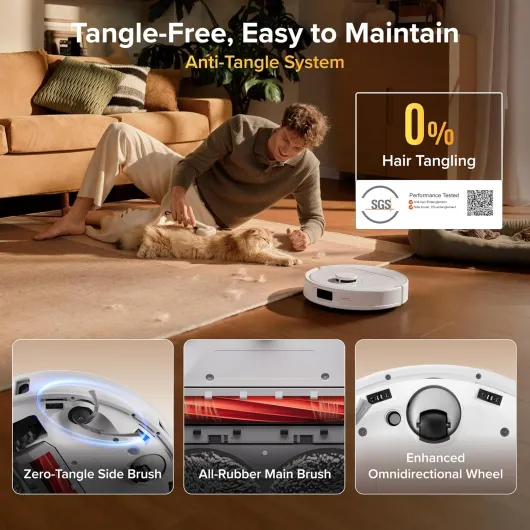
Build quality feels solid enough. The plastic doesn’t feel cheap, the hinges on the dock lid aren’t flimsy, and the robot’s bumpers and wheels have held up fine so far. The main brush is all rubber, which helps with hair removal, and there’s a zero‑tangle side brush and an omnidirectional wheel that are supposed to resist hair wrap. In practice, I still check them once in a while, but I don’t have to cut hair out every few days like with some older vacuums I’ve used.
From a user point of view, the design is practical more than pretty. The top‑mounted LiDAR means it can’t fit under ultra‑low furniture, and the big dock isn’t exactly discreet, but the tradeoff is easy access to bags and tanks and a robot that can actually see and plan routes. If you care more about performance and convenience than having a super sleek object, the design is fine. If you want something that disappears visually, this isn’t it.
Battery life and charging: enough for most homes, but not unlimited
The Qrevo S Pro has a rated battery life of up to 180 minutes, and that lines up pretty well with what I’ve seen. In my two‑bedroom setup, a full vacuum and mop of around 35–45 m² usually takes under an hour and uses about 30–40% of the battery depending on suction level and how much carpet is involved. That means I can easily run a couple of routines in a day without worrying about it dying mid‑clean.
If you have a larger house, it can still manage by returning to the dock to recharge and then resuming the job. The app shows you remaining battery and estimated area cleaned, so you get a rough idea of how much it can handle on a single charge. The brand claims about 30% faster charging, and while I didn’t sit there with a stopwatch, it does seem to recover from 20–30% back to full in a reasonable time, more than fast enough for daily use.
One thing I like is that you can set charging preferences in the app, like focusing on off‑peak hours if your electricity is cheaper at night. It’s a small detail but it matters if you’re running it regularly. The robot is also smart enough not to constantly top up from 95% to 100%; it seems to manage its battery sensibly instead of trickle‑charging all day long. Over time that should be better for battery health.
Overall, the battery situation is pretty straightforward: for flats and average‑sized houses, it’s more than enough for daily cleaning. If you live in a very large place with multiple floors, you’ll either need to move the dock or accept that it will tackle things in stages. It’s not a downside, just something to keep in mind if you’re expecting it to clean a mansion in one go on max suction.
Everyday comfort: noise, maintenance and how “hands-free” it really is
Day to day, this thing is pretty easy to live with. Noise level is one of the strong points: on normal suction it’s around 55 dB, which in real life means you can have a conversation in the same room without shouting. It gets louder when it hits carpet and boosts suction, but still not as loud as a regular upright vacuum. The dock emptying cycle is the noisiest part, but it’s short and not worse than other self‑emptying docks I’ve heard.
Maintenance is fairly light but not zero. The 2.7 L dust bag in the dock genuinely lasts several weeks for me, even with a dog. You just pop the lid, pull out the bag, and replace it. The clean and dirty water tanks need attention every week or two depending on how often you mop. Emptying the dirty water is the least pleasant bit (it looks and smells like you’d expect) but at least you’re not hand‑mopping that grime yourself. The 75°C mop washing and 45°C warm air drying do help keep the mop pads from smelling, and so far I haven’t had any musty odour from them.
As for the "hands‑free" claims: it’s partially true. You don’t have to babysit it once the maps and schedules are set. But you still have to do some prep: pick up cables and small clutter, secure light rugs, and occasionally clean hair from the main brush and wheels. The anti‑tangle design helps, especially if you have pets or long hair, but it doesn’t magically erase all maintenance. I check the brushes maybe once every couple of weeks instead of every few days like with older models, which is an improvement.
Comfort also includes how easy the app is to live with. In my experience it’s straightforward, and I like that you can quickly send the robot to clean a single room or zone without redoing everything. The only slightly clumsy bit is that if you run a mop cycle and then a separate vacuum cycle right after, the automatic mop drying doesn’t always resume by itself; sometimes you need to trigger drying manually. Not the end of the world, but it’s one of those quirks you only notice after regular use.
Vacuum and mop performance: good daily cleaner with a few blind spots
On the vacuum side, the 18,500 Pa suction sounds huge, but in reality what matters is how well it handles normal dirt. On hard floors, it picks up crumbs, dust, and dog hair reliably. The first few runs pulled a surprising amount of junk from under furniture and along baseboards. You may still see the odd hair or crumb here and there, especially in corners and tight edges, but overall the floors look clean after a run. On carpet, it automatically ramps up suction and you can hear it working harder, but the noise is still reasonable.
Rugs are where it can get a bit fussy. Lightweight rugs, especially ones without anti‑slip backing, can get bunched up if you don’t secure them. I had to add grippy pads under a thin rug to stop it from moving. Once that was done, the robot handled it fine and didn’t drag it around the room. It also manages thresholds and slightly uneven floors better than I expected. My old house has some wonky transitions and it climbs them without getting stuck.
The mopping is more about maintenance than scrubbing dried‑on disasters. With the dual spinning mops and adjustable water levels, it does a good job on daily stains: footprints, light kitchen splashes, pet paw prints. It’s not going to remove old, baked‑in stains in one pass, but if you run it regularly the floors stay presentable. The nice part is that it lifts the mops by 10 mm on carpets, so you don’t end up with damp patches on your rugs every time it crosses them. You still need to be a bit careful with very thick carpets, but for typical rugs and normal carpet it’s okay.
Navigation is one of the highlights. The PreciSense LiDAR and obstacle avoidance do a decent job of not wasting time wandering around. It follows logical paths, doesn’t miss big areas, and rarely gets stuck on furniture. The weak spot is small, low objects: slippers, thin cables, toys, and similar stuff. If I forget to pick up a pair of slippers, there’s a good chance it will try to climb them or shove them. So the performance is strong if you give it a half‑decent environment to work in, less so if your floor is cluttered all the time.
What you actually get and how it behaves day to day
Out of the box you get the robot, the big multipurpose dock, dock base, power cable, two mop modules, and the usual manual. Setup is straightforward: plug in the dock, drop the robot on it, install the app, connect to 2.4 GHz Wi‑Fi (no 5 GHz, which is slightly annoying if your router is messy), and let it map your place. The first mapping run was quick and surprisingly accurate, about 90% right in my case. I only had to tweak a couple of walls and rename rooms.
The app is honestly one of the strengths here. You can split and merge rooms, set no‑go zones, tell it how to behave on carpets, adjust suction and water levels per room, and schedule routines. For example, I have mine set to vacuum and mop the kitchen and hallway every morning, then vacuum only the living room carpet later in the day. The custom carpet strategy is handy: it can automatically boost suction and lift the mops by 10 mm when it detects carpet, so you don’t end up soaking your rug.
In practice, the robot’s navigation is pretty smart. It doesn’t ram into furniture legs at full speed, and it does a decent job circling around table and chair feet to catch crumbs. It also fits under my sofa and TV stand, which is where a lot of hair and dust usually hides. It’s not flawless at obstacle avoidance though. Low stuff like slippers, cables, and thin toys are still a problem. If you’re the type who leaves things scattered on the floor, you’ll either need to tidy up a bit or draw no‑go zones in the app.
Overall, as a package, it feels like a mid‑to‑high range robot without the camera bells and whistles. There are fancier models out there, but this one hits a decent balance between features and price. Just don’t expect the AI‑sounding “SmartPlan 2.0” to read your mind; it’s more about sensible defaults and decent mapping than anything futuristic.
Pros
- Strong everyday cleaning on hard floors and carpets with decent pet hair pickup
- All‑in‑one dock that self‑empties, washes mops at high temperature, and dries them
- Good app with room‑by‑room control, custom carpet strategy, and flexible scheduling
Cons
- Still struggles with low objects like slippers, cables, and small toys
- Large dock takes up noticeable space and needs access to power and water handling area
- Corners and very tight spaces still need occasional manual cleaning
Conclusion
Editor's rating
The Roborock Qrevo S Pro is a solid option if you want a robot that can genuinely take over most of your day‑to‑day floor cleaning. The suction is strong enough for normal dirt and pet hair, the dual spinning mops keep hard floors looking clean, and the all‑in‑one dock means you’re not constantly emptying bins or rinsing pads by hand. Navigation is sensible, the app is easy to use, and the noise level is low enough that it doesn’t feel like you’ve fired up a jet engine every time it runs.
It’s not perfect. It still struggles with low, light objects like slippers and cables, and lightweight rugs may need anti‑slip help. Corners and tight spots will still need an occasional manual pass. The dock is big and not exactly subtle, and you do have to keep up with water tanks and the odd brush check. But if you can live with those tradeoffs and you actually use the scheduling and room settings, it does make everyday cleaning a lot less of a chore.
I’d recommend it for people with mixed floors, pets, and a medium‑sized home who want “set it and mostly forget it” cleaning. It makes sense if you’re okay with picking up clutter and doing light maintenance in exchange for not dragging a vacuum around every other day. If your place is tiny, always cluttered, or you’re on a tight budget, a simpler and cheaper robot (or just a regular vacuum) might be enough. For everyone else, this is a pretty balanced machine with good value for what it offers.