
Summary
Editor's rating
Price and value: not cheap, but fair if you actually use it
Design and footprint: slim robot, chunky station
Battery life and runtime: long enough for most homes
Cleaning performance: daily dirt is handled, corners still meh
What you actually get with the Omni C20
Mopping and hands-free features: useful, but don’t fire your mop yet
Pros
- Cleans well on hard floors and does a decent job on rugs with strong suction
- All-in-one station auto-empties dust and washes/dries the mop, reducing maintenance
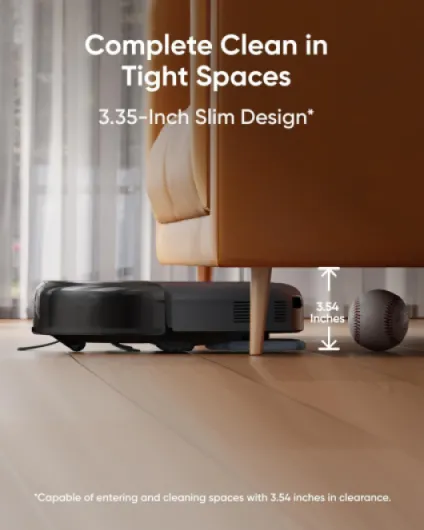
- Slim robot body fits under low furniture and reaches spots many vacuums miss
Cons
- Bulky base station takes up noticeable floor and height space
- Still misses corners and very tight edges like most round robots
- Only supports 2.4 GHz Wi‑Fi, which can be annoying with modern routers

Specifications
View full product page →| Brand | eufy |
A robot vacuum that actually saves time (mostly)
I’ve been using the eufy Omni C20 for a few weeks in a fairly normal setup: a three-bedroom flat, mix of hard floors, a couple of rugs, kids making crumbs, and a cat that sheds. I didn’t treat it gently – I basically set it up, let it map the place, and then used it like a lazy person would: schedules, spot cleans, and almost no manual vacuuming unless it messed up. My goal was simple: can this thing realistically replace 80–90% of my regular vacuuming and light mopping, or is it just another expensive gadget that looks good in an ad?
From day one, what stood out is that this is not a tiny toy robot. It’s a full system with a big base station that vacuums out the dust, washes the mop, and dries it. So you’re not just buying a small hoover; you’re buying a cleaning station that wants its own little corner of the house. If you live in a studio with no spare wall space, that’s something you feel right away. If you have a hallway or utility corner, it’s easier to live with.
I used it mostly on auto mode every morning for the main living area, plus some targeted runs in the kitchen after meals and a weekly deeper run with max suction on the rugs. I also tried the mopping on dried coffee spots and the usual footprints near the entrance. I didn’t baby it: there were cables on the floor, shoes lying around, and the odd toy that got left out. That’s where you really see if the navigation and obstacle handling are decent or just hype.
Overall, the Omni C20 does what it says on the box: it vacuums, it mops, it empties itself, and it needs way less babysitting than older models I’ve tried. It’s not perfect – it takes up space, it still misses some corners, and the 2.4 GHz Wi-Fi limitation is annoying in 2026 – but in day-to-day life, it actually cuts down the time I spend cleaning the floors. If you expect spotless edges and manual-level scrubbing, you’ll be a bit disappointed, but if you just want the floors to stay reasonably clean without thinking about it, it’s pretty solid.
Price and value: not cheap, but fair if you actually use it
The Omni C20 sits in that mid-to-high price range for robot vacuums with full stations. It’s not budget, but it’s also not at the crazy prices of some premium brands that easily go over a thousand. Compared to something like a Dyson robot or other big-name flagships, it’s usually significantly cheaper while doing roughly the same kind of job: vacuuming, mopping, auto-emptying, washing and drying the mop. So if you’re already looking at high-end robots, this one feels like decent value for money rather than a bargain or a rip-off.
Where the value really depends is how you live. If you’re actually going to run it daily or several times a week, and you hate vacuuming and mopping, then the cost makes more sense. In my case, I’ve basically stopped doing regular vacuuming and only do a manual deep clean every couple of weeks. That’s a real time saver, and over a year or two, the price feels justified. If you’re the type who will use it for a month and then let it sit because you can’t be bothered to maintain the water tanks or dust bags, then it’s just an expensive box taking up space.
There are some downsides that affect perceived value. The station is big, so if you’re in a small flat, the space trade-off might not be worth it. Corner cleaning is still not perfect, so if you’re super picky, you might still feel like you need a stick vacuum on top. And the 2.4 GHz Wi-Fi limitation is just dated at this point. None of these are deal-breakers, but they keep it from feeling like a perfect purchase.
Overall, I’d say the Omni C20 is good value for someone who wants a serious, mostly hands-free floor cleaning setup and is okay paying a bit for convenience. If your budget is tight or you don’t mind pushing a vacuum once or twice a week, a simpler robot or even a decent cordless vacuum might make more sense. But if the idea of your floors getting cleaned while you sleep or work actually sounds useful to you, this one justifies its price pretty well.

Design and footprint: slim robot, chunky station
The robot itself is ultra-slim at about 3.35 inches high, and that does matter. It can slide under most sofas, TV units, and low furniture where dust usually piles up. In my case, it got under the sofa and bed without scraping, which is a big win because those are the spots I normally ignore until things get embarrassing. Compared to older, taller robots I’ve tried, this one definitely reached more spots under furniture. So the low profile isn’t a gimmick; it’s actually useful.
But then there’s the station. It’s not tiny. The dimensions are roughly 33 x 28.9 x 46 cm, and in real life that feels like a small side table stuck against the wall. You need enough depth so the robot can dock comfortably and enough height clearance for the station. If you live in a small flat, you will notice it and you’ll probably have to rearrange a bit to give it a home. I ended up moving some shoes and a small shelf in the hallway just to make it fit in a way that didn’t annoy me visually.
The look is pretty neutral: black, modern, nothing flashy. It doesn’t scream “tech toy,” which I liked, but it’s also not some design object you want to show off. The plastic feels solid enough, and the robot itself doesn’t feel cheap when you pick it up. The station door, water tanks, and dust bag cover all open and close without feeling flimsy. I wouldn’t call it premium, but it’s definitely not bargain-bin build quality either. It sits somewhere in the middle: good enough that you don’t think about it much.
One thing that stands out is noise. During normal cleaning, the robot is not too loud – you can still watch TV or have a conversation, especially on the medium suction setting. When it docks and the station sucks out the dust, it gets loud for a few seconds, similar to a normal vacuum on full power. It’s short, but if you schedule it at 5:30am, you’ll hear that burst. I wouldn’t put the station right next to a bedroom wall if you’re a light sleeper. So design-wise: slim, practical robot, but a base that clearly demands its own zone and makes a bit of noise when it does the emptying.
Battery life and runtime: long enough for most homes
The battery on the Omni C20 didn’t give me any major headaches. On a single charge, it handled my downstairs area – roughly 70–80 square meters with furniture – on standard suction and mopping in one go without needing to recharge. It took around 70–90 minutes depending on how many obstacles it had to navigate around. The app doesn’t shout about the exact battery capacity, but in practice, I never had it die mid-clean on a normal run. That’s what really matters: you hit go, and it finishes.
When I pushed it harder – max suction on carpets and doing a full-house clean including bedrooms – it sometimes went back to the station to top up. The good thing is it resumes where it left off, so it’s more of a time issue than a user problem. You might come back two or three hours later to a finished job instead of one long continuous session, but you don’t have to do anything. Personally, I’d rather it take longer and finish than try to squeeze everything into one run and fail halfway.
Charging time is pretty standard: a few hours from low to full. It’s not fast-charging tech or anything fancy, but since it usually charges between scheduled cleans, it never mattered to me. The only time you might care is if you run multiple deep cleans in a row, which most people won’t. For daily use, it’s fine: schedule it once a day or every other day and forget it.
One thing worth pointing out is how the battery ties in with suction choices. On medium suction, which I used the most, you get a nice balance: quiet enough, strong enough, and good runtime. Max suction obviously eats more battery, so if you insist on running everything on high all the time, expect shorter runs and more returns to the dock. I ended up using a mix: standard for hard floors, higher suction only for rugs and carpets. That seemed like the sweet spot for both cleanliness and battery life. Overall, the battery is not a highlight but also not a weakness – it just does its job without calling attention to itself.
Cleaning performance: daily dirt is handled, corners still meh
In terms of raw cleaning, the Omni C20 does a good job on day-to-day mess. On hard floors, it picked up crumbs, cat hair, dust, and small food bits without any issue on the standard suction setting. I only used the max 7,000 Pa mode on rugs or after a messy weekend, and you can hear the difference – it ramps up and gets noticeably stronger. On my medium-pile rug in the living room, it didn’t pull out every embedded hair like a corded vacuum would, but it got enough that the rug looked clean and felt decent underfoot. For a robot, that’s about what I expect.
The navigation is pretty logical. It tends to outline the room first, then goes in straight lines back and forth. That’s nice because you can see the coverage and it doesn’t seem to miss big sections. It rarely got stuck for me, except a couple of times on loose cables and once on a stray sock. That’s normal robot vacuum behavior. The obstacle avoidance is decent but not magic: it slows near chair legs, small objects, and bags, but if you leave thin cables or tiny toys around, it can still chew on them. I wouldn’t rely on it to babysit a messy playroom.
Where it’s weaker is the same place most round robots struggle: corners and tight edges. The side brush helps pull dirt in, but it still leaves a thin line of dust right in the very corners of some rooms and along skirting boards if there’s any lip or gap. You only really notice if you get down and look, or when you manually vacuum once in a while. So if you’re super picky about edges, you’ll still want a quick pass with a handheld vacuum now and then. For me, that’s acceptable since the robot is handling 90% of the workload.
The Pro-Detangle comb on the roller brush is genuinely handy if you have pets or long hair in the house. On my old robot, I had to cut hair off the brush every week. With the C20, I still had to clean the brush, but much less often. The reverse rotation and comb do help loosen hair, so it ends up in the dust bag instead of welded to the roller. It’s not magic – you’ll still do some maintenance – but it cuts down the time you spend with scissors in hand. Overall, performance is solid: it keeps the place looking clean with very little effort, as long as you accept that it’s not a deep-clean corner specialist.
What you actually get with the Omni C20
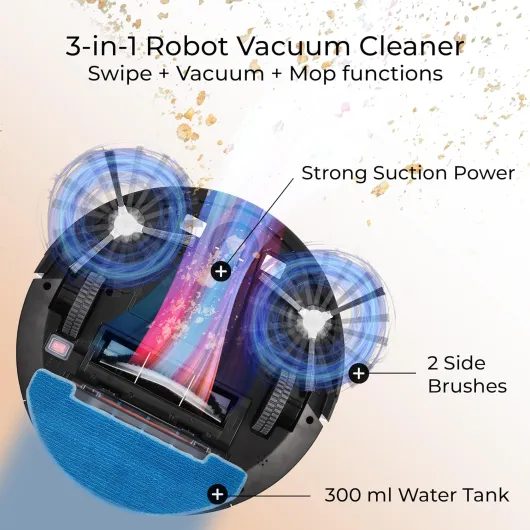
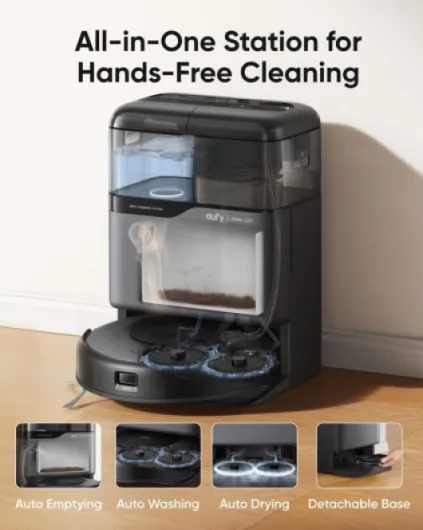
The Omni C20 is basically a package: the robot itself plus an all-in-one station that handles auto-emptying, mop washing, and drying. The robot has up to 7,000 Pa suction, a rolling brush, a side brush, and a mop module that spins at around 180 rotations per minute with 6N of pressure. On paper, that sounds very strong, but in practice it’s just a solid, high-end robot vacuum that can handle typical home dirt, pet hair, and crumbs without drama. It’s designed for multi-surface use – hard floors, low to medium pile carpets, and rugs.
The station has separate clean and dirty water tanks plus the dust bag area. The tanks are transparent, which is actually handy because you can see at a glance when you’re running low on clean water or when the dirty one is getting grim. I found myself checking visually instead of relying on the app, which felt more natural. The dust bag in the station easily lasted me a couple of weeks with daily runs in the main areas, and I didn’t feel like I was constantly dealing with maintenance.
Setup is pretty straightforward, but there are a couple of catches. First, it only supports 2.4 GHz Wi‑Fi, not 5 GHz. If your router merges both bands under one name, you may need to split them or dig in your router settings, which is annoying if you’re not into that stuff. Second, the first mapping run takes a bit of time, and you really do need to open all doors and clear the floor reasonably well. When I rushed the first mapping, it missed a room and I had to redo it, which was a bit of a pain but only a one-time thing.
Once it’s mapped, the app lets you split rooms, set no-go zones, and choose where to vacuum and where to mop. You can schedule runs for specific rooms at specific times, and it supports voice control with Alexa and Google Home. In day-to-day use, I mostly ignored the fancy options and just set up a simple morning schedule for downstairs, plus a quick button in the app to clean the kitchen after dinner. That’s the real value here: you set it once and then mostly forget about it, aside from refilling the water and emptying the dirty tank once a week or so.
Mopping and hands-free features: useful, but don’t fire your mop yet
The mopping part is where I was the most skeptical, because a lot of robot mops just drag a damp cloth around and pretend they’re cleaning. The Omni C20 is better than that. The Mop Master system with 180 RPM spinning pads and 6N pressure actually scrubs a bit. On everyday dirt – light footprints, dust, a bit of dried spill – it handled things well. The floor felt cleaner under bare feet, and you could see the difference in the dirty water tank. For quick maintenance mopping a few times a week, it’s genuinely helpful.
But let’s be realistic: it’s not replacing a proper manual mop for tough stains. Dried-on food stuck to the floor, thick mud, or old sticky patches still need a manual pass. In my tests, dried coffee and normal kitchen splashes came off fine, but anything thicker or older usually needed a bit of pre-scrubbing or at least a manual wipe before letting the robot finish. So I’d say it’s good for keeping floors clean, not for fixing disasters. Also, you still have to refill the clean water tank and empty the dirty one regularly, usually once a week for a medium-size home.
The hands-free stuff is where this robot shines a bit more. Auto-emptying works like it should: the robot returns to the base, the station roars for a few seconds, and dust goes into the bag. I barely touched the robot’s internal bin. The mop washing and drying are also handy – no more dealing with a gross, damp mop pad every time. After each mopping session, it returns, washes the pads, and dries them with room-temperature air, so you don’t get that stale smell some older models had. You still eventually have to clean the station tray and replace mop pads, but it’s much less frequent work.
The carpet detection and mop lifting are important if you have mixed floors. On my carpets, it lifted the mop and boosted suction automatically, so I didn’t end up with a wet rug, which was my main worry. It’s not perfect – I wouldn’t run it over very thick or expensive carpets while mopping – but on normal rugs it behaved fine. Overall, as a “hands-free” system, it gets close: you handle the water and dust bag once in a while, and the rest is pretty automatic. Just don’t expect miracles on heavy stains or think you’ll never touch a mop again.
Pros
- Cleans well on hard floors and does a decent job on rugs with strong suction
- All-in-one station auto-empties dust and washes/dries the mop, reducing maintenance
- Slim robot body fits under low furniture and reaches spots many vacuums miss
Cons
- Bulky base station takes up noticeable floor and height space
- Still misses corners and very tight edges like most round robots
- Only supports 2.4 GHz Wi‑Fi, which can be annoying with modern routers
Conclusion
Editor's rating
The eufy Omni C20 is a solid all-in-one robot for people who genuinely want to stop thinking about daily floor cleaning. It vacuums well on hard floors, does a respectable job on rugs, and the mopping is good enough to keep things clean between proper deep cleans. The station handles dust emptying, mop washing, and drying without much fuss, so your involvement drops to refilling water, emptying the dirty tank, and swapping a dust bag every now and then. In normal use, it really does cut down the amount of time you spend pushing a vacuum or mop.
It’s not flawless. The base station is bulky, the robot still struggles with corners like most round models, and the 2.4 GHz Wi‑Fi limitation feels outdated. If you’re short on space or very picky about edges and deep carpet cleaning, you’ll still want a hand vacuum or a traditional cleaner in the cupboard. But if you have a bit of room for the station and your main goal is to keep floors “always reasonably clean” with minimal effort, it hits that target pretty well.
I’d recommend the Omni C20 to busy households, pet owners, and anyone who’s happy to pay a mid-to-high price to save time and effort. It’s also good for older users who struggle with regular vacuuming, as long as someone can help with initial setup and occasional maintenance. If you’re on a tight budget, live in a very small space, or actually enjoy cleaning, you can skip it and go for something simpler and cheaper. For everyone else who wants a mostly hands-off solution, this is a practical, no-nonsense option.