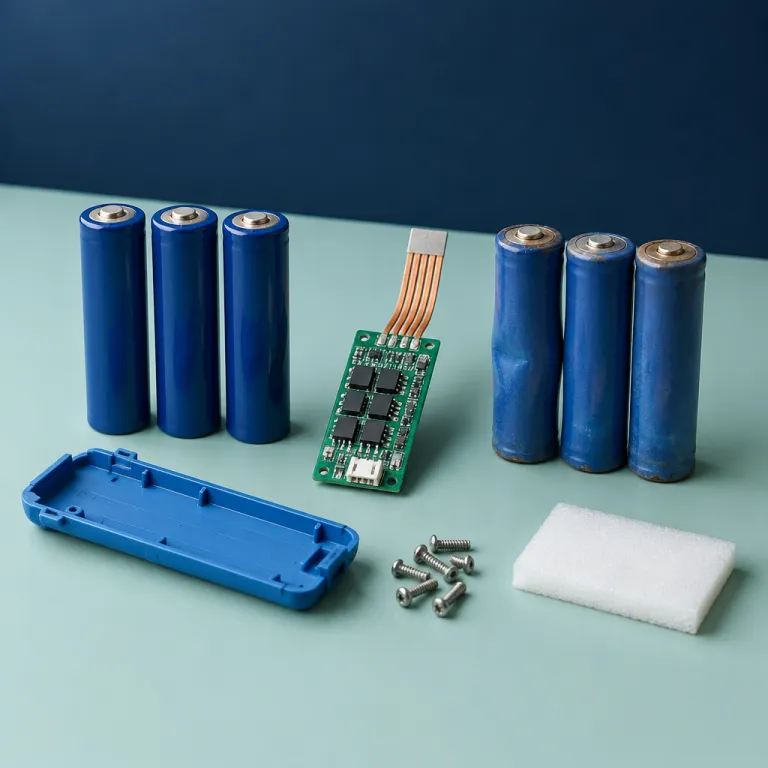
How robot vacuum batteries age from day one
Lithium ion batteries in a robot vacuum start aging the moment you plug in the charging dock. Over hundreds of charging cycles, the chemistry inside these ion batteries loses active material, which slowly reduces battery capacity and shortens practical battery life. That is why a robot that once cleaned for 120 minutes on a single charge may struggle to reach 70 or 80 minutes after enough time and use.
Every charge and discharge adds microscopic wear, and those cycles accumulate into visible battery wear that affects runtime and cleaning coverage. High temperature during charging or storage accelerates this battery degradation, so a vacuum cleaner left in a hot laundry room or sunny window will usually lose battery performance faster than the same cleaner kept in a cooler hallway. Owners who run long robot cleaning sessions daily will also hit the limit of typical charging cycles sooner, especially on compact vacuums battery packs with modest energy density.
Most mainstream robot vacuums use lithium ion packs rated for several hundred full charging cycles before noticeable battery lifespan loss. In practice, that means two to four years of solid performance for a budget robot vacuum or vacuum mop, depending on floor size, cleaning time per run, and how often the robot returns to the dock to top up its power. The same physics applies whether you own a basic robot battery pack in an entry level robot or a larger battery robot inside a premium vacuum cleaner with a mop module.
Reading the signs: is your battery or your robot slowing down
When a robot vacuum starts missing patches of carpet, the first suspect is often navigation, but battery life is just as likely. Shorter runtime, more frequent mid job charging, and weaker suction near the end of a cleaning cycle all point toward a tired vacuum battery rather than a confused robot. If your robot vacuums used to finish the whole floor in 70 minutes and now need 110 minutes with extra dock visits, the pack is probably losing capacity.
Watch how your robot behaves on a single charge during a normal cleaning routine. A healthy battery robot should leave the charging dock, clean steadily with consistent power, then return once when the job is done, while a worn pack forces the cleaner to limp home early, recharge, and resume several times. Some models even lower suction automatically when battery capacity drops below a threshold, which protects battery lifespan but also reduces cleaning performance on carpets and rugs.
Pay attention to the dock as well, because charging hardware can mask or worsen battery wear. A misaligned charging base or a cheap third party dock can cause partial charge sessions that confuse the robot and shorten effective runtime over time. For a deeper look at why the dock matters as much as suction, guides on advanced cleaning stations and charging docks explain how smarter charging can protect both batteries and long term robot performance.
Battery replacement: cost, difficulty, and brand differences
Once you see clear battery wear, the next question is whether battery replacement makes sense for your specific robot vacuum. On many mid range models, a replacement robot battery costs between a modest fraction and roughly half of a new robot, while premium vacuums battery packs can be more expensive and harder to source. Some brands design the battery pack as a user replaceable module, while others bury it under layers of plastic that require a service center visit.
Check the underside of your vacuum cleaner for a small door marked battery, because that usually signals a straightforward swap with a screwdriver and ten minutes of work. Where the pack is not accessible, opening the shell can void warranties or damage fragile connectors, so a professional replacement may be safer even if the battery robot itself seems simple. Before buying, confirm the exact battery capacity, connector type, and whether the manufacturer recommends only genuine batteries or approves certain third party batteries with similar energy density and charging cycles.
Brand specific guides can help, especially for popular models and their batteries. For example, detailed advice on understanding a Shark vacuum battery shows how different models handle charging, runtime, and long term battery performance. The same logic applies to other robot vacuums and vacuum mop combinations, where a larger pack must power both suction and mop functions without sacrificing cleaning time or overall battery lifespan.
When to keep the robot and when to upgrade entirely
Deciding between a new battery and a new robot comes down to simple math and honest inspection. If your robot vacuum is under five years old, still navigates accurately, and only shows shorter runtime, a fresh vacuum battery is usually the best value. When the robot also bumps into furniture, leaves crooked maps, or drags a worn brush, the case for a full upgrade becomes stronger.
Start by pricing an official battery replacement and comparing it with current robot vacuums that match your cleaning needs. If a new pack restores 90 minutes of runtime and strong power for a fraction of a new long robot model, keeping the existing cleaner is often the sustainable choice. On the other hand, if your older models lack basic features like room mapping, carpet boost, or a reliable charging dock, a new robot with better energy density and smarter charging cycles may cut total cleaning time and electricity use.
Look at accessories too, because worn wheels, cracked bumpers, and noisy gearboxes signal broader wear beyond the battery robot pack. When replacement parts are scarce or overpriced, putting more money into batteries for a fading vacuum cleaner rarely pays off. In those cases, a modern robot mop or vacuum mop combo with efficient lithium ion batteries and longer battery life can deliver better performance per dollar and a cleaner floor in fewer minutes.
Extending battery life from the first clean
Good habits from day one can stretch robot vacuum battery life well past the two year mark. The goal is to reduce unnecessary charging cycles, avoid extreme temperatures, and keep the pack operating in a comfortable middle range of charge. That means letting the robot finish its cleaning run, then rest on the dock without forcing repeated manual starts that drain and refill the pack in short bursts.
Place the charging dock in a cool, shaded area with good airflow, because heat is the enemy of lithium ion chemistry and long term battery performance. Avoid garages that swing from freezing to hot, and do not block the vents on the robot or dock, since trapped heat accelerates battery wear and shortens effective runtime over time. If you leave home for several weeks, many manufacturers recommend powering down the cleaner and storing it around half charge, which protects both energy density and overall battery lifespan.
Routine maintenance also helps, because a clogged filter or tangled brush forces the vacuum to draw more power for the same cleaning job. When the cleaner can glide easily and the suction path stays clear, it finishes in fewer minutes and uses fewer charging cycles across its life. While you are maintaining the robot, consider upgrading edge brushes with a tested kit such as the edge sweeping brush three pack for Roomba Combo and Roomba i, e, j series, which can improve cleaning coverage without increasing power draw.
Real world expectations after two years of use
By the two year mark, most lithium ion batteries inside robot vacuums have lost a noticeable slice of their original capacity. A robot that once ran for 120 minutes may now manage 80 to 90 minutes, which still covers many apartments but can leave larger homes half cleaned. If your vacuum cleaner consistently returns to the dock with unfinished rooms, that is the moment to evaluate both battery replacement and the overall health of the robot.
Think about how your home and habits have changed since you bought the robot vacuum. Maybe you added a dog, more rugs, or a bigger space, all of which increase cleaning time and push the vacuum battery harder on each cycle. In that scenario, even a new battery robot pack might not deliver the longer runtime you now need, so upgrading to newer models with higher battery capacity and smarter power management can be the more rational move.
On the other hand, if your space and expectations stayed stable, a simple battery replacement can restore near original performance for far less money and waste. Swapping a tired pack for a fresh one keeps a solid long robot cleaner out of the landfill and aligns with a sustainability focused approach to home tech. Either way, treating the pack as a consumable part with a finite battery lifespan helps you plan ahead instead of being surprised when cleaning time suddenly shrinks.
FAQ
How long should a robot vacuum battery last before replacement
Most lithium ion packs in robot vacuums deliver strong battery life for roughly two to four years of regular use. Heavy daily cleaning, high temperatures, and long runtime on carpets shorten that window, while cooler storage and moderate charging cycles can extend it. When your robot needs multiple dock visits for a simple job, the pack is usually ready for replacement.
Is it worth replacing the battery instead of buying a new robot
Replacing the vacuum battery makes sense when the robot still navigates well, cleans effectively, and has accessible parts. If a new pack costs far less than a comparable new model and restores enough runtime to finish your floors in one pass, it is usually the better value. When mapping glitches, worn wheels, and scarce spare parts join poor battery performance, a full upgrade is often smarter.
Can I use third party batteries in my robot vacuum
Some robot vacuums work safely with third party batteries that match the original battery capacity, voltage, and connector type. Others rely on firmware checks that reject non genuine packs or limit charging, which can hurt battery performance and even void warranties. Always confirm compatibility with the manufacturer and choose reputable ion batteries rather than the cheapest option.
How can I extend the lifespan of my robot vacuum battery
Keep the charging dock in a cool, ventilated spot and avoid storing the robot in very hot or very cold rooms. Let the cleaner run full cycles instead of repeatedly starting and stopping short jobs, which add unnecessary charging cycles. Regularly cleaning filters and brushes reduces power draw, helping the pack maintain longer runtime over its battery lifespan.
Why does my robot stop mid clean even though it shows some charge left
As lithium ion batteries age, voltage can sag under load, so the robot may shut down early to protect the pack even when the indicator still shows remaining charge. This behavior often appears after many charging cycles and signals growing battery wear. If software updates and dock checks do not fix it, a fresh battery replacement usually restores stable cleaning time.