
Summary
Editor's rating
Is it worth the price or just expensive convenience?
Low profile and clever, but that dock is huge
Battery life and how it handles bigger spaces
Suction, obstacle avoidance, and real-world cleaning
What you actually get with the Qrevo Edge 2
Mopping and self-cleaning: decent, but not magic
Pros
- Very strong suction and good pickup on both hard floors and rugs
- Low profile with retractable LiDAR lets it clean under more furniture than most robots
- Dock handles dust emptying, hot-water mop washing, and drying, reducing manual maintenance
Cons
- Large dock takes a lot of space and isn’t exactly subtle
- App and multi-floor mapping can be fiddly, with occasional room name confusion
- Still struggles with long cords, tasselled rugs, and rare dust-path blockages that need manual fixing

Specifications
View full product page →| Brand | roborock |
A robot that finally does more than just wander around
I’ve been using the Roborock Qrevo Edge 2 for a few weeks in a fairly normal setup: 3-bedroom house, mix of hard floors, a couple of rugs, one pet, and a family that is not great at keeping the floor clear. Before this I had an older mid-range robot vac (no AI, basic LiDAR) that mostly did laps and got stuck on cables. So I wasn’t expecting miracles, just something that would actually keep the floors decent without me babysitting it.
First impression: this thing feels like a big jump from the older generation. The main differences I noticed right away were how low it is, how it avoids small objects, and the fact that it actually cleans edges and corners instead of leaving a dusty line around every room. The dock is chunky and a bit of a unit, but in exchange it handles dust emptying and mop washing, which is basically what I’m paying for.
It’s not perfect though. The app is packed with options and can be a bit fiddly at first, multi-floor stuff is slightly annoying, and you still need to watch out for things like tasselled rugs and long strings or toy wands. Also, if something blocks the dust path to the dock, you’re in for a bit of disassembly, as one Amazon reviewer found out. So it’s not a magic box you forget about forever, but it’s closer than older robots I’ve used.
Overall, after these few weeks, I’d say it’s a pretty solid daily cleaner if you want vacuum + light to medium mopping and you’re okay with the price. It won’t replace a deep manual scrub of the floor once in a while, but it definitely cuts down how often you need to do it. If you’re coming from something like a Q7 or a basic Eufy, the difference in power and intelligence is very noticeable.
Is it worth the price or just expensive convenience?
Price-wise, the Qrevo Edge 2 sits in the higher bracket of robot vacuums, especially compared to basic Eufy or Ecovacs models. You’re paying for a mix of high suction, AI avoidance, edge cleaning, and a very capable dock. If you only need a simple robot to do a quick vacuum on hard floors, this is probably overkill. There are cheaper models that will do a basic job, as long as you’re okay with more manual work and less intelligence.
Where it starts to feel more justified is if you’re coming from an older Roborock like the Q7+ or a dumb robot with no camera. Several users, including one upgrading from a Q7+, clearly felt the difference was big enough to be worth it: stronger suction, actual edge and under-furniture cleaning, better mopping, and a dock that does more than just empty dust. If you’re already used to the idea of spending decent money on a robot, this one feels like a proper next step rather than a minor refresh.
Ongoing costs are there but not insane. You’ll eventually need replacement dust bags, brushes, and mop pads, but they’re easy to find online and not outrageously priced. Water and maybe a bit of floor cleaner are your only other consumables. The main "cost" is really the space the dock takes and the time you spend tuning the app and dealing with the occasional hiccup (like a caught toy wand or a weird multi-floor mapping glitch).
For me, in day-to-day life, the value shows up in small ways: I vacuum manually a lot less, mopping is mostly off my plate, and I don’t have to tidy the whole floor before every run. It’s not cheap, and there are a few rough edges in the software and occasional navigation fails, but as a daily maintenance tool, it earns its place. If money is tight or you’re in a tiny place, I’d say look at something cheaper. If you want a fairly hands-off cleaning setup and can live with the big dock and the price, then it’s a solid buy.
Low profile and clever, but that dock is huge
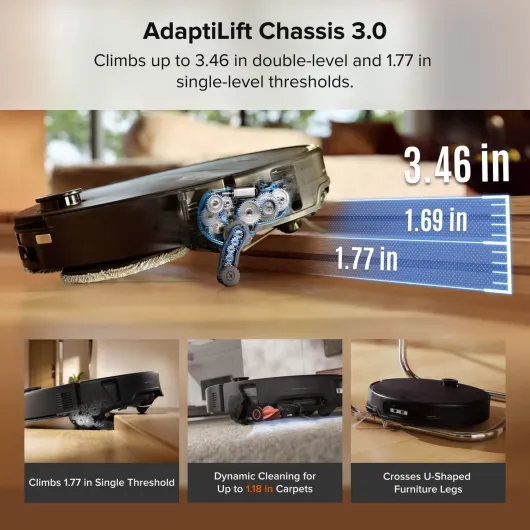
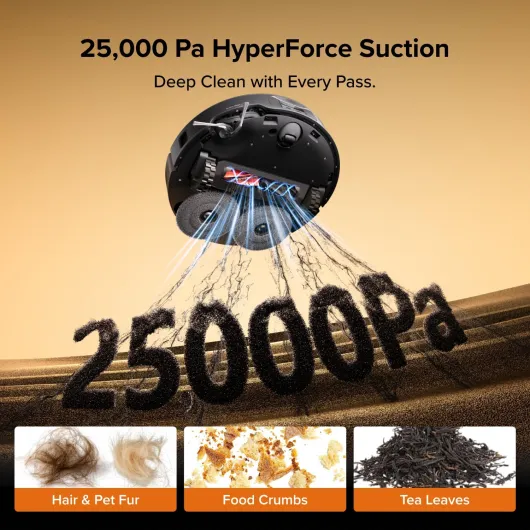
The stand-out thing in the design is the 3.14" ultra-slim body with the retractable LiDAR turret. On my older robot, the LiDAR bump on top was exactly what stopped it from going under the TV unit and beds. This one drops the turret down, slides under, and suddenly those dead zones actually get cleaned. That was one of the first differences I noticed: less dust under the sofa and fewer fur balls drifting out from under furniture.
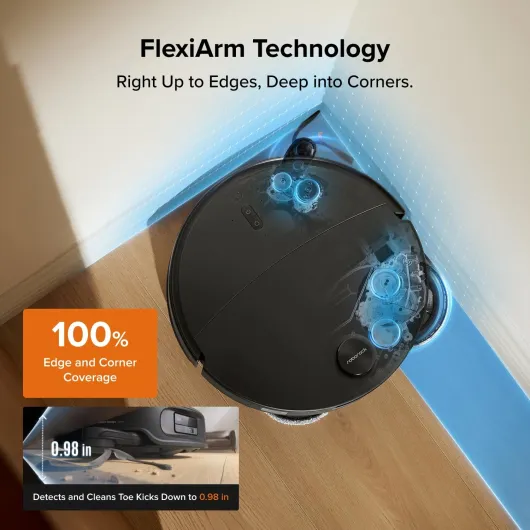
The FlexiArm side brush is another design bit that isn’t just marketing. It extends out to reach into corners and along skirting boards, and in daily use you do see less of that typical "uncleaned edge" line. It’s not perfect in very tight corners, but compared to a standard fixed side brush, it does a better job of dragging dirt out from the sides. For people who hate seeing that 2–3 cm border of dust, this actually matters.
On the flip side, the dock is big and heavy. You need a decent amount of space against a wall, and ideally near a plug where you don’t mind having this white or black tower sitting permanently. It houses dust bags, clean and dirty water tanks, and the hot water washing system, so the size is understandable, but don’t expect something discreet. If you live in a small flat, you’ll really feel it. Also, while the dock looks fairly modern, it’s still a plastic box, not a design object.
Build quality feels solid overall. The robot itself doesn’t feel flimsy, the mop modules clip on and off easily, and the water tanks are simple to pull out and rinse. One minor annoyance: because it’s so low, it sometimes tests the limits of what it can fit under. On one of my sofas, it just clears, but on another with a slightly saggy fabric edge, it hesitates or doesn’t go under at all. One reviewer also mentioned it not going under their sofas as expected, so don’t assume it will magically fit everywhere just because it’s slim.
Battery life and how it handles bigger spaces
The Qrevo Edge 2 claims up to 180 minutes of battery life, and that seems roughly accurate in balanced modes. In my 3-bedroom house, it can handle the entire downstairs (kitchen, living room, hallway, small office) plus a quick touch-up in one upstairs room on a single charge, as long as I’m not running max suction everywhere. On standard or balanced power, it comes back to the dock with a decent chunk of battery left.
If you crank the suction up to max or use a more aggressive mopping mode, battery drains faster, obviously. On my medium-pile rug with high suction, you can see the percentage drop more quickly, but the robot is smart about it. If it thinks it won’t finish the job, it will return to the dock, recharge, and then resume where it left off. That’s fairly standard on decent robots now, but it works reliably here.
For multi-floor setups, the battery is fine, but the workflow is a bit clunky. You need to carry the robot upstairs and sometimes manually send it to clean a specific map. The robot itself can handle the cleaning run battery-wise, but since the dock stays downstairs, you lose the auto-empty and auto-refill during that run. One reviewer mentioned the app mixing up room names between floors, which I’ve also seen in a lighter way—it’s usable, but not as smooth as a dedicated dock per floor.
Noise-wise, it’s acceptable. On lower modes, it’s easy to ignore if you’re in another room. On max suction or when the dock is auto-emptying, it’s loud enough that you don’t want it going off during a call. That’s where the scheduling and Do-Not-Disturb settings help. I’ve set mine to do most of the cleaning very early in the morning (like one Amazon user at 4–5 a.m.), and I just close the bedroom door. Battery plus scheduling means you can basically treat it as a nightly maintenance run and forget about it until you notice floors staying consistently cleaner.
Suction, obstacle avoidance, and real-world cleaning
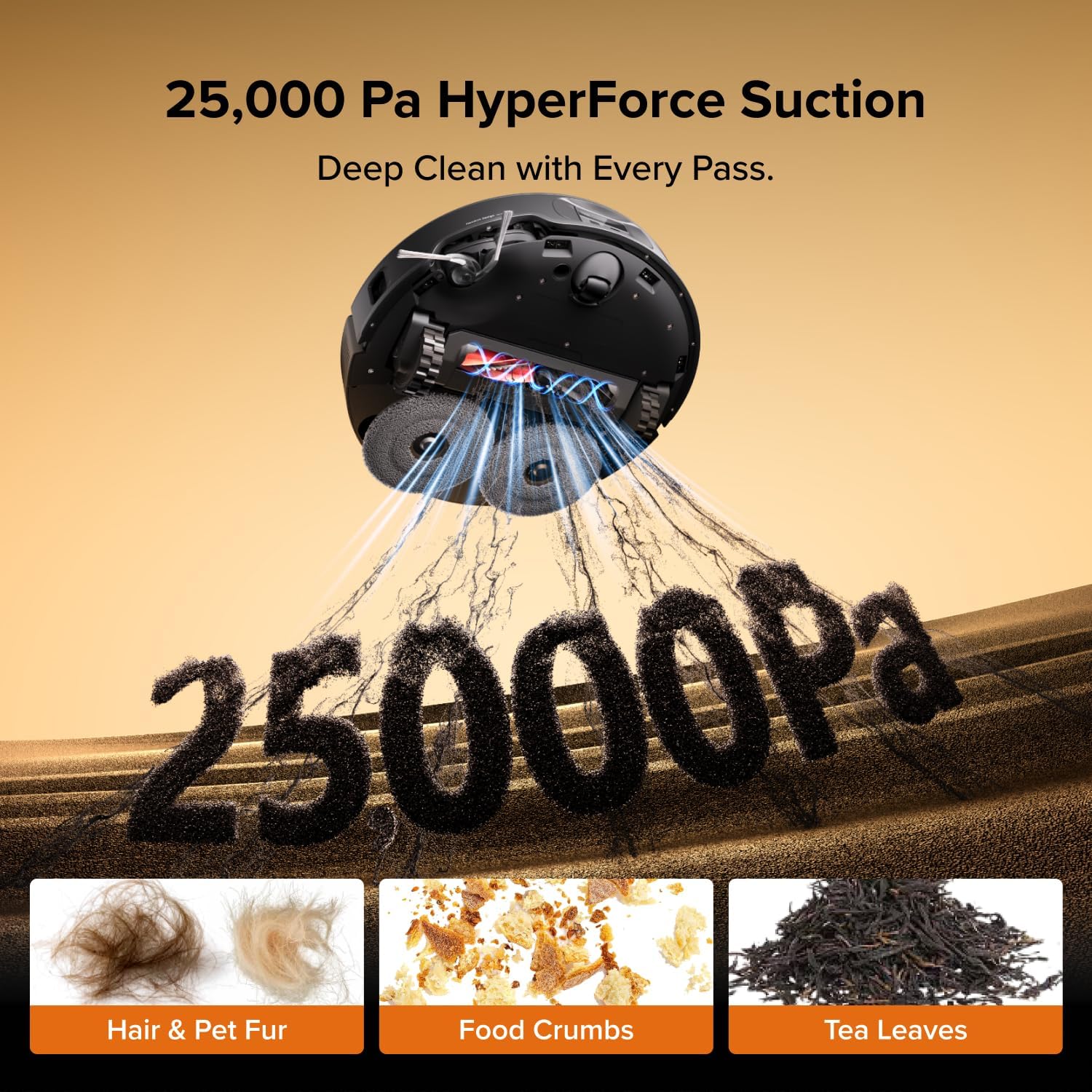
Let’s talk about the 25,000 Pa suction, because that number is huge compared with most robots. In real use, you do feel the difference. On hard floors, it picks up grit and cat litter without scattering it everywhere, which is something cheaper robots struggle with. On rugs, it pulls up embedded dust that my old robot clearly missed. I wouldn’t say it replaces a proper upright with a powered brush on thick carpet, but for everyday dirt and pet hair, it’s genuinely strong.
The zero-tangle system is another thing that actually helped. With long hair in the house, I used to have to cut hair off the brush every week. With this one, after a few weeks, the brush was way cleaner than I expected. Hair still collects a bit, but it doesn’t form that tight wrap around the roller that kills suction. So if you have pets or people with long hair, this is a real plus, not just a buzzword.
The AI obstacle avoidance is good, but not magic. It handles shoes, cables on the floor, pet bowls, and random clutter much better than the old "dumb" robots. You don’t need to prep the floor as much, which is a big quality-of-life improvement. That said, long thin things like cat toy wands or cords can still trip it up, and rugs with loose edges or tassels can get caught. So you still need a basic level of tidiness if you don’t want to rescue it occasionally.
Coverage is solid. The mapping is quick and accurate, and once it has a map, it follows a proper back-and-forth path without missing big areas. The FlexiArm helps get closer to walls, and the AI dirt detection means it sometimes does a second pass in dirtier spots like the kitchen or entryway. In my place, a full downstairs clean is consistent and reliable. It’s not perfect—sometimes it leaves a tiny bit of debris in weird spots or struggles with very dark rugs—but for daily cleaning, it gets the job done well enough that I don’t pull out the normal vacuum nearly as often.
What you actually get with the Qrevo Edge 2
Out of the box, you get the robot itself, the big multifunction dock, a separate dock base, power cable, and the dual rotating mop modules. No spare bags or extra brushes in my box, so don’t expect a huge accessory kit. Setup is straightforward: plug in the dock, fill the clean water tank, stick the robot on it, and then do the usual WiFi + app pairing. Note that it’s 2.4 GHz WiFi only, so if you’re on a fancy mesh system you might have to fiddle a bit.
The dock is where most of the value is. It auto-empties the dustbin, washes the mop pads with 80°C hot water, dries them with warm air, and refills the robot’s water. On paper, this means less touching dirty pads or dust. In practice, it does work like that, as long as the dust path doesn’t get blocked by some random bit of plastic or debris, which did happen to at least one buyer. When it works properly, you can realistically forget about emptying dust for around two months, depending on how dirty your place is.
The robot uses AI obstacle avoidance with a camera and structured light. That’s a fancy way of saying it can actually see stuff like shoes, cables, and pet bowls and try to go around them instead of eating them. The app even stores photos of obstacles, which is both useful and a bit funny when it logs your cat staring it down. Compared to older robots that just slam into everything, this is a big step up in real-world use.
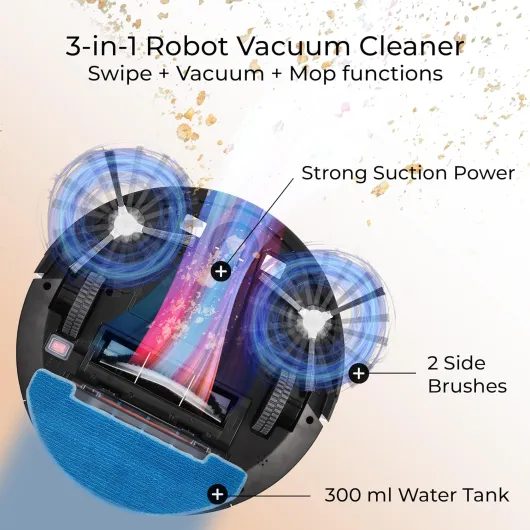
Feature-wise, it’s loaded: 25,000 Pa suction (so way stronger than the usual 2,000–5,000 Pa robots), edge-cleaning side brush that extends out, mop auto-lift on carpets, smart scheduling, AI-based room recognition, and Do-Not-Disturb options. The downside of all these options is that the app can feel like a control panel for a small spaceship. It’s powerful, but you do need to spend a bit of time tuning it to how you actually live, otherwise you’re not really using half of what you paid for.
Mopping and self-cleaning: decent, but not magic
The mopping system is better than the usual "wet cloth dragged around" you get on basic robots, but it’s still not the same as scrubbing the floor by hand. You get dual spinning mops with 8N downward pressure, and on normal spills and footprints it does a good job. The floor looks clean and dries quickly because it doesn’t flood it with water. For daily maintenance on tiles and LVT, I’d say it’s more than enough.
On tougher, dried-on stains, you can see the limit. It will lighten them or remove them if you run it a couple of times, but if you’ve got something really baked in, you’ll still need to spot clean manually. One user mentioned roller-mop robots doing slightly deeper cleaning, and I’d agree with that: this system is good, but not the deepest scrub on the market. Where it wins is in convenience: it lifts the mops on carpets, so you don’t end up with soggy rug edges, which used to drive me mad with older models.
The dock’s 80°C hot water mop washing is actually useful. Instead of you rinsing pads over the sink, the dock does a proper hot wash and then dries them with warm air. That means they don’t sit there damp and smelly between runs. Over time, that’s a big hygiene plus, especially in kitchens. The dock also does a self-clean cycle with hot water, which keeps the internal tray from getting too gross, but you’ll still have to occasionally pull out the tray and give it a manual rinse.
As for dust handling, when it’s not blocked, the auto-empty feature works well. You hear a short burst of loud suction, and the bin is basically empty. One user had an early blockage issue with a piece of plastic inside the dust path, which they had to remove themselves, and support was slow to respond. That’s worth keeping in mind: if something goes wrong in the dust channel, you might have to be a bit hands-on. But in normal operation, the combo of strong suction, decent mopping, and automatic maintenance actually does reduce the amount of manual cleaning you do week to week.
Pros
- Very strong suction and good pickup on both hard floors and rugs
- Low profile with retractable LiDAR lets it clean under more furniture than most robots
- Dock handles dust emptying, hot-water mop washing, and drying, reducing manual maintenance
Cons
- Large dock takes a lot of space and isn’t exactly subtle
- App and multi-floor mapping can be fiddly, with occasional room name confusion
- Still struggles with long cords, tasselled rugs, and rare dust-path blockages that need manual fixing
Conclusion
Editor's rating
The Roborock Qrevo Edge 2 is a strong option if you’re after a robot that actually does more than wander around and miss corners. The combination of low profile, edge-focused brush, and AI obstacle avoidance makes it noticeably better in real use than older models and budget brands I’ve tried. It picks up pet hair and grit well, doesn’t freak out at every cable, and the mop system is good enough that regular manual mopping becomes an occasional thing instead of a weekly chore.
It’s not perfect. The dock is big, the app can be a bit messy on multi-floor setups, and long strings, tassels, or toy wands can still cause trouble. The mopping is solid for maintenance but won’t replace a deep scrub of dried stains. You also need to accept that sometimes you’ll be opening things up to clear a blockage or rinse the dock tray. But overall, it lines up with the reviews: around a 4.3/5 product feels fair.
I’d recommend it to people with mixed flooring, pets, and low furniture who want a mostly hands-off cleaning routine and are okay paying for the convenience. If your budget is tight, your place is very small, or you don’t care about mopping and AI features, you can definitely get away with a cheaper robot. For everyone else who wants something that genuinely reduces day-to-day cleaning, this is a pretty solid choice, as long as you go in knowing it’s a helper, not a magic cleaning robot that never needs attention.